Monetizing a YouTube channel means joining the YouTube Partner Program and turning on the earning features you qualify for, usually ads and Premium revenue at the full tier. YouTube checks numeric thresholds and non-numeric rules, then reviews the channel, and meeting the thresholds does not guarantee approval. This guide covers requirements and ads only: the tiers, what counts, applying, rejection, and ad and Premium revenue. Sponsorships, affiliate income, products, and memberships have their own guide, and you can earn from several of them before you qualify for ads.
Compare the two tiers
Start with the two tiers, because confusing them is the most common beginner mistake. The table below uses full-tier thresholds confirmed from YouTube Help on 2026-11-01, and reports the earlier-access tier and the announced 2027 change as reported information. Confirm current terms in YouTube Studio before you apply.

| Tier | Subscribers | Watch route | Shorts route | Features unlocked | | Earlier-access tier (reported) | 500 | 3,000 qualified watch hours in 12 months | 3 million qualified Shorts views in 90 days | Fan funding and Shopping features only, not ad or Premium revenue | | Full tier (confirmed from YouTube Help, 2026-11-01) | 1,000 | 4,000 qualified watch hours in 12 months | 10 million qualified Shorts views in 90 days | Ad revenue and Premium revenue, plus fan funding and Shopping features |
The earlier-access tier does not pay you from ads. It gives access to fan funding features, such as channel memberships and Super features where available, and to Shopping features. If your goal is ad income, the full tier is the target. You need either the watch-hour route or the Shorts route, not both, plus the subscriber count. The watch-hour route and the Shorts route measure different things, and the next section explains exactly what counts for each, because many channels overestimate their progress by counting hours and views that YouTube does not count.
Pass the non-numeric gates
Beyond the numbers, YouTube checks a set of non-numeric gates. Your channel must be in a country or region where the Partner Program is available, must follow all YouTube monetization policies and community guidelines, and must have no active community guidelines strikes. You must have two-step verification turned on for the Google account behind the channel. You must also have an AdSense account linked, or be ready to link one during the application, because that is how YouTube pays you. Originality matters in review. Channels that mainly re-upload other people's content, or use artificial intelligence tools to mass-produce low-effort videos, risk rejection, even with strong numbers. Views or subscribers gained through artificial means can disqualify a channel. If you use artificial intelligence tools, follow current disclosure guidance in Studio and show that your content adds real value.
Know what counts
What counts toward the thresholds is narrower than many creators expect, and this is where honest tracking pays off. For the watch-hour route, qualified public watch hours count. Hours from private videos, unlisted videos, deleted videos, and videos promoted through ad campaigns do not count. Shorts Feed watch time does not count toward the 4,000-hour route, which surprises many Shorts creators. Livestream hours count only once the livestream has been converted and the usual rules apply, so unconverted livestream time should not be treated as qualifying time. For the Shorts route, qualified Shorts views count, which means genuine views on your Shorts within the 90-day window, not views bought or driven by artificial traffic. Check the eligibility tracker in YouTube Studio regularly, rather than trusting a third-party counter, because Studio shows the progress YouTube itself will use and separates the two routes.
Apply in Studio
When Studio shows you meet a route, the application itself is a guided process, not a form you submit blind. Open YouTube Studio, go to the Earn section, and follow the application steps. You will be asked to review and accept the Partner Program terms, set up or link an AdSense account, and submit the channel for review. The AdSense step deserves care. Use accurate details, because mismatches delay payment later. If you already have an AdSense account, link it rather than creating a second one, since duplicates cause problems. If you do not have one, create it during the application with the same care you would give a bank form, and keep the login details safe. After submission, review typically takes about one month, according to YouTube Help as confirmed on 2026-11-01, though timing can vary. During review, keep publishing normally and avoid sudden large changes. For the official eligibility page, see YouTube Help on monetizing your channel.
Run a pre-application audit
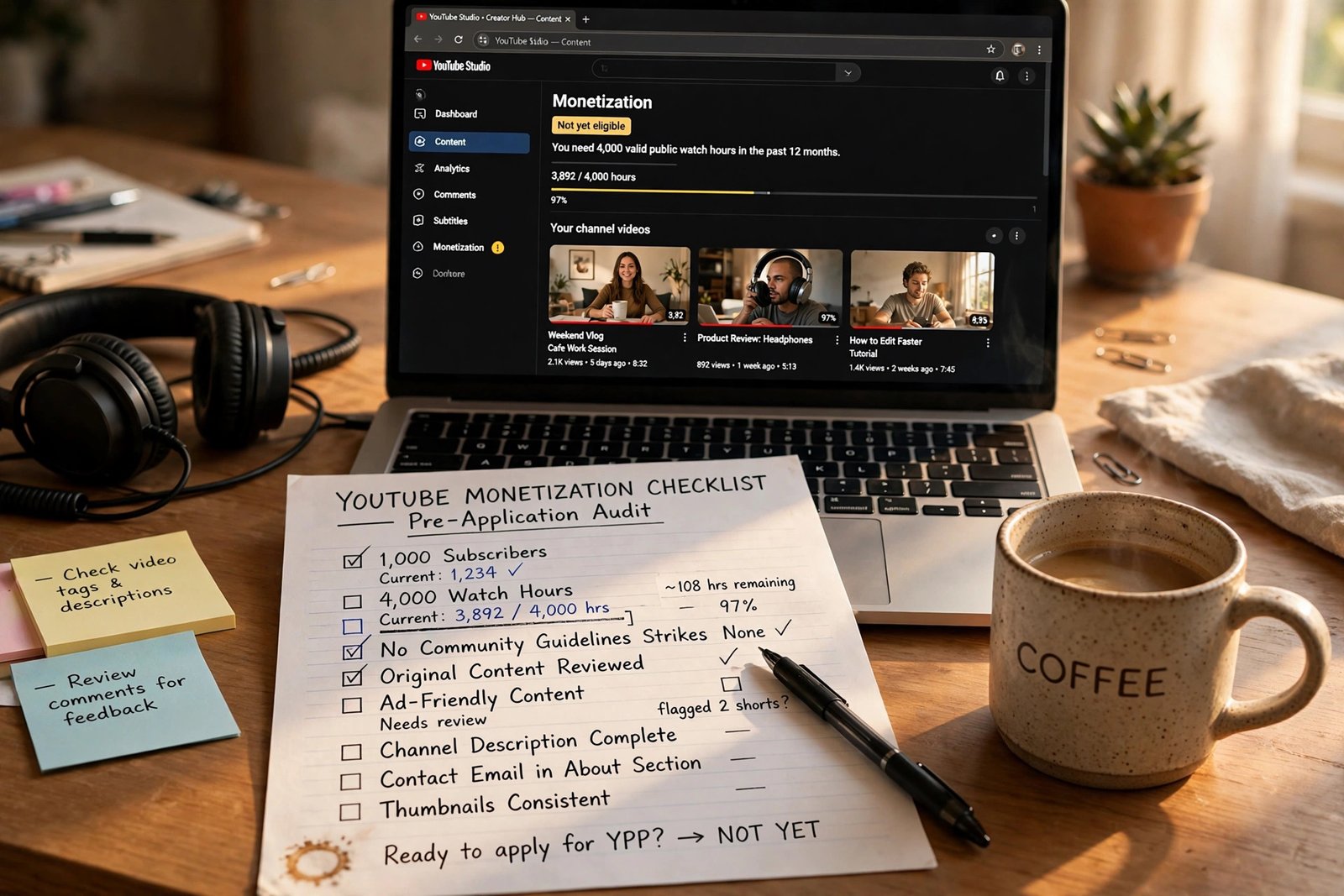
Run a pre-application audit before you submit, because it catches the problems that cause most rejections. Work through this checklist honestly, video by video if needed. First, check every public video for reused content: can you point to what you added, such as original commentary or demonstration? Second, remove or unlist videos that are mainly other people's material, and fix any copyright problem rather than hoping a reviewer misses it. Third, check your channel for strikes, warnings, and policy notices in Studio, and resolve anything outstanding. Fourth, check that your channel description, titles, and thumbnails honestly match the videos, since misleading packaging counts against trust. Fifth, check that your engagement is genuine: no bought subscribers, no view exchange groups, no comment pods that inflate engagement artificially. Sixth, confirm two-step verification is on and that the linked AdSense details are accurate. If any item fails, fix it and wait before applying. Applying with a known problem wastes a review cycle and adds a rejection to your record.
Handle approval and rejection
Approval means you can turn on ad formats and start earning from ads and Premium views, but it does not mean every video earns, and it does not mean a fixed rate per view. Rejection means YouTube found the channel does not yet meet the rules, and the notice should state the general reason, such as reused content or policy issues. If you believe a rejection was a mistake, YouTube Help confirms an appeal window of 21 days, so act promptly and address the specific reason rather than resubmitting the same channel unchanged. If you do not appeal, or an appeal does not succeed, you can reapply after 30 days following a first rejection, and after 90 days following later rejections, according to YouTube Help as confirmed on 2026-11-01. Use that waiting period to fix the stated problem properly: remove or rework reused content, publish original videos that show the channel's real value, and re-run the audit above before you reapply. Repeated applications with no changes waste time and do not improve your chances.
Understand ad revenue
Once accepted, ad revenue comes from several mechanics, not from a single rate. On long-form watch pages, creators receive a share of advertising revenue, reported as 55 percent to the creator in the competitor guides reviewed for this article. For Shorts, revenue flows through a Creator Pool model, reported as 45 percent to creators in those guides, where ad revenue from the Shorts Feed is pooled and shared based on qualifying views, with music licensing costs accounted for before the split. YouTube Premium revenue is shared with creators based on how much Premium members watch their content. These shares are reported figures from the competitor guides, not quotes from the Help page text fetched for this article, so confirm them in Studio if they matter to a decision. CPM is what advertisers pay per thousand ad impressions, and it varies by topic, audience, season, and demand. RPM is what you receive per thousand views after YouTube's share and after views that showed no ad. There is no fixed income per 1,000 views.
Get paid
Payment follows a monthly cycle with a threshold, and taxes are your responsibility. According to the competitor guides reviewed here, earnings are finalized between the 7th and the 12th of the following month, and payments are issued between the 21st and the 26th, with a payment threshold of 100 dollars in the United States. Treat those dates and that threshold as reported details to confirm in AdSense, because they can differ by currency and country. Set up payment early, keep tax information current, and keep records of income and expenses. YouTube does not handle your local tax filing, so check official guidance for your location. Do not spend expected income before it is finalized, because finalized earnings can differ from Studio estimates.
Stay monetized
Staying monetized requires the same discipline as getting accepted. YouTube can remove a channel from the program for repeated policy violations, for reused content problems, or for inactivity of six months or more, according to YouTube Help as confirmed on 2026-11-01. Keep publishing original content, keep disclosures honest, and respond to policy notices promptly. One change needs care: competitor guides and secondary summaries report that, for new ad and Premium applicants from 1 February 2027, the full-tier requirement will rise to 8,000 qualified watch hours in 365 days or 20 million qualified Shorts views in 90 days, with 1,000 subscribers unchanged, and Shorts revenue will then require 10 million qualified Shorts views per 90-day period. This change was not on the Help page text fetched for this article, so treat it as announced and reported, not a Help-page quote, and confirm current terms in Studio before you apply. If you want income before ads, read How to Make Money on YouTube Without Ads in 2026, and if you are still setting up, start with How to Start a YouTube Channel in 2026.
Risks and limitations
Monetization carries real limits worth stating plainly. Ad income at small scale is usually small and uneven, because it depends on views, advertiser demand, audience location, and season. A channel can meet the thresholds and still be rejected for originality or policy reasons, and a channel can be accepted and later removed for violations or long inactivity. Tax and payment details differ by country and currency, so general guidance here cannot replace checking your own AdSense account and local rules. The reported 2027 change, described above as announced rather than confirmed from the Help page text, could change again before it takes effect, which is why Studio confirmation is part of the advice, not an optional extra. Results vary with experience, niche, audience, time, competition, and platform rules, and no article can promise a date by which you will qualify or earn a particular amount.
Frequently asked questions
How many subscribers do I need to monetize on YouTube?
For full ad and Premium revenue, YouTube Help confirms 1,000 subscribers plus either 4,000 qualified watch hours in 12 months or 10 million qualified Shorts views in 90 days, as of 2026-11-01. A lower reported tier at 500 subscribers gives fan funding and Shopping features only, not ad revenue.
Do Shorts views count toward the watch-hour route?
No. Shorts Feed watch time does not count toward the 4,000-hour route. Shorts views count toward their own route, at 10 million qualified Shorts views in 90 days for the full tier as confirmed from YouTube Help.
How long does YouTube monetization review take?
Review typically takes about one month, according to YouTube Help as confirmed on 2026-11-01, though timing can vary. Keep publishing normally during review and do not make sudden large changes to the channel.
What happens if my monetization application is rejected?
You should receive a general reason, such as reused content or a policy issue. You can appeal within 21 days if you believe it was a mistake, or fix the problem and reapply after 30 days for a first rejection and 90 days for later rejections, according to YouTube Help.
How much does YouTube pay per 1,000 views?
There is no fixed rate. Income per thousand views depends on advertiser demand, topic, audience location, season, and how many views showed ads. RPM, which is what you receive per thousand views after YouTube's share, is the useful number to track in Studio.
Conclusion
Monetization is a checklist: reach the full-tier thresholds, pass the non-numeric gates, audit before you apply, link AdSense, and expect ad income to vary with demand, not a fixed rate. Do the audit before you submit, use a rejection waiting period to fix real problems, and confirm current terms in YouTube Studio before you apply, especially given the reported 2027 change for new applicants. Your next step is to open Studio, check your eligibility tracker against the full-tier numbers in this guide, and run the pre-application audit on your most recent videos. For income you can build before ads, read How to Make Money on YouTube Without Ads in 2026, and for the system that grows the channel toward those thresholds, read How to Grow a YouTube Channel in 2026.